

This demonstrates a professional, non-blocking approach to sending emails from a Python Quart application using background tasks. No extra Python modules are needed—this approach uses the built-in smtplib module included with Python.
Quart Application Skeleton
Start by activating your Python virtual environment. Then install the quart module.
python3 -m venv .venv

source .venv/bin/activate

pip install quart
After that, create app.py and include the code below.
from quart import Quart, render_template, websocket

app = Quart(__name__)

@app.route("/")
async def welcome():
    return {"message": "hi"}


@app.route("/api/send-email")
async def send_email():

    return {"message": "Notification sent in the background"}
Create SandBox SMTP Email Account
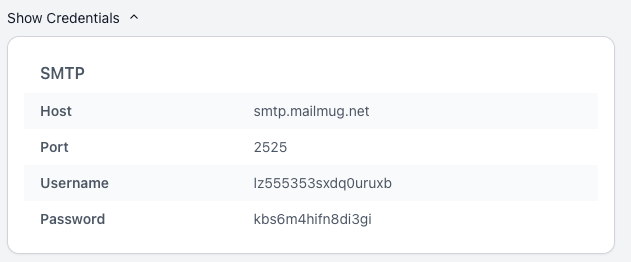
MailMug.net offers a free SMTP account to safely test emails, or you can use any other SMTP service like Gmail.

Python Quart: Email Function Example
from email.mime.text import MIMEText
from email.mime.multipart import MIMEMultipart
import smtplib

port = 2525
smtp_server = "smtp.mailmug.net"
login = "username" # paste your login generated by mailmug
password = "pass" # paste your password generated by mailmug
sender_email = "mailmug@example.com"

def send_email_task(message: MIMEMultipart, to_email: str):
    html = """\
        <html>
        <body>
            <p>Hi,<br>
            This is the test email</p>
        </body>
        </html>
        """
    part = MIMEText(html, "html")
    message.attach(part)

    server = smtplib.SMTP(smtp_server, port)
    server.set_debuglevel(1)
    server.esmtp_features['auth'] = 'LOGIN DIGEST-MD5 PLAIN'
    server.login(login, password)
    server.sendmail(
        sender_email, to_email, message.as_string()
    )
Debug output can be disabled by setting set_debuglevel to 0.
server.set_debuglevel(1)
Add a Background Task in Quart for Sending Emails
Add route “/api/send-email” to send email. Use the add_background_task method to add a background task. The first argument is a callback function; in our example, send_email_task serves as the callback.
@app.route("/api/send-email")
async def send_email():
    to_email = "new@example.com"
    message = MIMEMultipart("alternative")
    message["Subject"] = "Test subject"
    message["From"] = sender_email
    message["To"] = to_email
    app.add_background_task(send_email_task, message, to_email)
    return {"message": "Notification sent in the background"}
Complete Code
from quart import Quart, render_template, websocket
import smtplib
from email.mime.text import MIMEText
from email.mime.multipart import MIMEMultipart


app = Quart(__name__)

@app.route("/")
async def welcome():
    return {"message": "hi"}


port = 2525
smtp_server = "smtp.mailmug.net"
login = "username" # paste your login generated by mailmug
password = "pass" # paste your password generated by mailmug
sender_email = "mailmug@example.com"


@app.route("/api/send-email")
async def send_email():
    to_email = "new@example.com"
    message = MIMEMultipart("alternative")
    message["Subject"] = "Test subject"
    message["From"] = sender_email
    message["To"] = to_email
    app.add_background_task(send_email_task, message, to_email)
    return {"message": "Notification sent in the background"}

def send_email_task(message: MIMEMultipart, to_email: str):
    html = """\
        <html>
        <body>
            <p>Hi,<br>
            This is the test email</p>
        </body>
        </html>
        """
    part = MIMEText(html, "html")
    message.attach(part)

    server = smtplib.SMTP(smtp_server, port)
    server.set_debuglevel(1)
    server.esmtp_features['auth'] = 'LOGIN DIGEST-MD5 PLAIN'
    server.login(login, password)
    server.sendmail(
        sender_email, to_email, message.as_string()
    )
Run the Quart Application
quart run
Open http://127.0.0.1:5000/api/send-email in your browser, then verify the email in your MailMug.net dashboard or your inbox if using a regular SMTP account.